Threat actors are weaponizing Microsoft Teams’ external collaboration features to impersonate internal IT helpdesk staff, and Microsoft 365 Unified Audit Logs are now a critical forensic data source for detecting and reconstructing these sophisticated social engineering campaigns.
Security teams investigating recent intrusions are uncovering a dangerous, rapidly evolving attack chain: attackers contact enterprise employees via external Microsoft Teams chats, pose as internal IT or helpdesk personnel, and instruct victims to execute attacker-provided commands or grant remote access, all within legitimate Microsoft infrastructure.
Microsoft has formally documented a nine-stage attack chain that begins with a threat actor initiating an unsolicited external Teams chat, claiming to address an account issue or apply a security update.
Attackers deliberately abuse legitimate .onmicrosoft.com subdomains official Microsoft-issued domains tied to Microsoft 365 Business subscriptions to make impersonated display names appear trustworthy.
Security monitoring firm Cynet reports that its CyOps threat operations unit has observed a sustained, escalating rise in this activity, categorized as “Teams vishing.”
Once a victim engages, the attacker instructs them to launch Windows Quick Assist or a third-party RMM tool such as AnyDesk, thereby granting full remote control of the device.
SpiderLabs analysis of one campaign observed that approximately 10 minutes into the Quick Assist session, victims were redirected to a malicious page deploying a trojanized executable (updater.exe).
A .NET Core 8.0 wrapper that retrieved encryption keys from a C2 server to execute fileless malware directly in memory, completely bypassing traditional signature-based defenses.
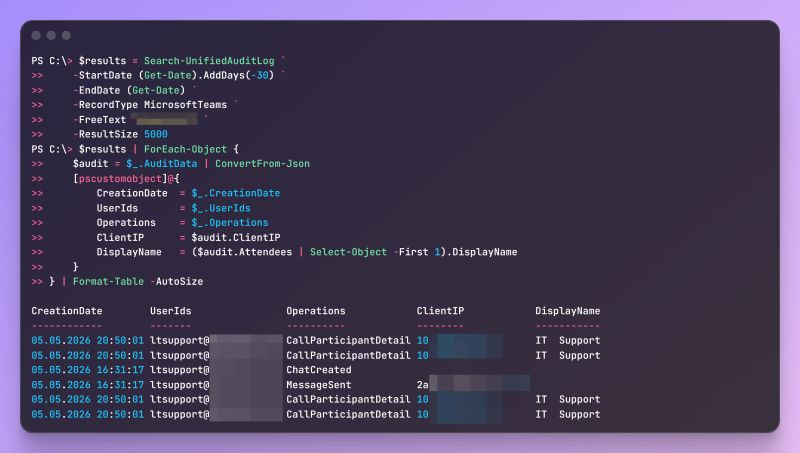
A critical but underutilized detection and investigation resource is the Microsoft 365 Unified Audit Log (UAL), accessible via Search-UnifiedAuditLog in PowerShell with the MicrosoftTeams workload filter.
Investigators querying the UAL for the CallParticipantDetail operation can retrieve participant identity data including display name, UPN, object ID, and tenant ID along with join/leave timestamps and connection metadata. This enables DFIR analysts to reconstruct cross-tenant call timelines with precision.
Key UAL operations relevant to Teams-based incident response include:
- CallParticipantDetail — logs participant identity, join/leave times, and connection metadata, including federated/external indicators
- MessageSent — records message delivery, critical for identifying attacker communication
- MessageCreatedHasLink — flags messages containing URLs, surfacing phishing links or payload delivery attempts
- ChatCreated — signals chat session initiation, though note that this is not a reliable Teams client signal; its absence does not confirm that no chat occurred.
Audit records typically appear within 60–90 minutes, with no guaranteed SLA, and the default UAL retention period is 180 days, enforced since October 2023.
When full message body retrieval is required, investigators must escalate to the eDiscovery or Content Search workflows, as the UAL surfaces metadata but not the message body, Security researcher Maurice Fielenbach says.
For tenants with Microsoft Defender for Office 365 or Microsoft Sentinel, two enrichment signals provide significant uplift:
- TeamsImpersonationDetected — flags display name spoofing indicative of cross-tenant impersonation attempts
- SecurityRiskInCallDetected — surfaces risk indicators during active Teams calls
Microsoft’s April 2026 cross-tenant helpdesk impersonation advisory confirms multiple intrusions that share this attack pattern.
It formally warns that threat actors are increasingly relying on living-off-the-land techniques, using built-in Windows tools and Microsoft-signed binaries to avoid detection once they have gained initial access.
In parallel, researchers at Arete IR have flagged two related vulnerabilities, CVE-2026-4670 and CVE-2026-5174, which could allow authentication bypass and privilege escalation in affected configurations, with no workaround or hotfix currently available.
Mitigation
Security teams should prioritize the following controls:
- Restrict external Teams federation to named users or groups with a legitimate business need; turn off “Chat with Anyone” via
Set-CsTeamsMessagingPolicy -UseB2BInvitesToAddExternalUsers $false - Block Quick Assist enterprise-wide — Microsoft’s own IANS Faculty guidance recommends outright blocking since it lacks modern authentication controls.
- Standardize remote support tooling to Teams Remote Help, scoped exclusively to authorized users in the Entra ID tenant.
- Treat first-contact external Teams activity as a triage trigger, especially when followed by a call, URL sharing, Quick Assist, AnyDesk, or script execution.
- Enforce out-of-band verification — train all employees to confirm IT support requests via a known internal channel before granting any access.
- Monitor EDR/XDR for living-off-the-land activity — unusual use of built-in admin tools, rarely executed binaries, and WinRM access from unexpected sources.
- Expand phishing awareness training to cover voice and video-based social engineering via collaboration platforms, not just email phishing.
The Microsoft 365 Collaboration Security feature for Teams generally available since March 2025 adds a further layer by detecting adversarial payload delivery and impersonation attempts directly within the Teams client.
FAQ
Q1: What is CallParticipantDetail in Microsoft 365 audit logs?
It is a UAL operation within the Microsoft Teams workload that records participant identities, join/leave times, tenant ID, and connection metadata for Teams calls.
Q2: How do attackers impersonate IT helpdesk staff in Microsoft Teams?
They create external tenants using .onmicrosoft.com domains, set display names matching internal IT staff, and initiate unsolicited cross-tenant chats or calls.
Q3: Why is Quick Assist dangerous in enterprise environments?
Quick Assist lacks modern authentication controls and allows full remote access to devices, making it a primary tool for post-social-engineering lateral movement and malware deployment.
Q4: How long are Microsoft Teams audit logs retained by default?
Default UAL retention is 180 days, a policy enforced since October 2023, giving DFIR teams a six-month investigative window.
Site: thecybrdef.com
For more insights and updates, follow us on Google News, Twitter, and LinkedIn.
About the Author